 DJ Music Organizer
1Download from the official source从官方来源下载
DJ Music Organizer is sold and delivered only through Gumroad. After you buy, Gumroad e-mails you a receipt with the download button and your purchase code. Both are also in your Gumroad Library.
DJ Music Organizer 只通过 Gumroad 销售和交付。购买后 Gumroad 会寄收据给你,里面有下载按钮和你的购买码。这两样也都在你的 Gumroad Library(资料库)里。
Official download addresses start with https://app.gumroad.com/, https://gumroad.com/d/ or https://mrbmusiclab.gumroad.com/ (links in your Gumroad receipt). Choose the Windows file named .
官方下载地址以 https://app.gumroad.com/、https://gumroad.com/d/ 或 https://mrbmusiclab.gumroad.com/ 开头(就是 Gumroad 收据里的链接)。请选择名为 的 Windows 文件。
Do not install DJ Music Organizer from any other website, file-sharing link, chat message or e-mail attachment. If someone sends you a copy, delete it and download again from Gumroad.
不要从其他网站、网盘、聊天消息或邮件附件安装 DJ Music Organizer。如果有人传给你安装文件,请删除它,回到 Gumroad 重新下载。
If your browser says the file “isn't commonly downloaded”, first check the source and the file in step 2, then choose Keep only if everything matches.
如果浏览器提示文件“不常被下载”,请先按第 2 步核对来源和文件,全部相符才选择保留。
2Check the file (SHA-256)核对文件(SHA-256)
A SHA-256 checksum is a fingerprint of the file. If even one byte is different, the fingerprint is completely different. This tells you the file you have is exactly the file we published.
SHA-256 是文件的“指纹”。文件哪怕只差一个字节,指纹也会完全不同。用它可以确认你手上的文件就是我们发布的那个文件。
| File name | 文件名 | |
|---|---|---|
| Version | 版本 | |
| Size | 大小 |
Official SHA-256
官方 SHA-256
How to check it on your PC
在电脑上核对的方法
- Press Win, type PowerShell and open it (no administrator needed).
- 按 Win 键,输入 PowerShell 并打开(不需要管理员)。
- Copy this command, paste it into PowerShell and press Enter:
- 复制下面这行命令,粘贴到 PowerShell,按 Enter:
The Hash it shows must be the same as the official SHA-256 above (upper or lower case does not matter). If your file is not in Downloads, change the folder in the command.
显示出来的 Hash 必须和上面的官方 SHA-256 完全一样(大小写不影响)。如果文件不在“下载”文件夹,请把命令里的路径改成文件实际的位置。
Optional extra check: right-click the file → Show more options → Scan with Microsoft Defender.
额外检查(可选):右键点文件 → 显示更多选项 → 使用 Microsoft Defender 扫描。
If the SHA-256 does not match, do not open the file. Delete it, download again from Gumroad, and contact support if it still does not match.
如果 SHA-256 不一样,请不要打开这个文件。删除它,从 Gumroad 重新下载;如果还是不一样,请联系我们。
3If Windows shows “Windows protected your PC”如果 Windows 显示“Windows 已保护你的电脑”
Microsoft Defender SmartScreen warns about programs that are new or not yet downloaded by many people. DJ Music Organizer is an independent app from a small developer: the Setup file is not yet code-signed and has not built a download reputation with Microsoft, so Windows may show this screen and list the publisher as Unknown publisher. The warning by itself does not mean a virus was found, but it also does not prove a file is safe; that is why the checks below matter.
Microsoft Defender SmartScreen 会对比较新、或下载人数还不多的程序发出提醒。DJ Music Organizer 是小型独立开发者的软件:安装程序目前还没有代码签名,也还没有在微软那里累积下载信誉,所以 Windows 可能显示这个画面,并把发布者显示为未知发布者。这个提醒本身不代表发现了病毒,但也不能证明文件一定安全,所以下面的核对很重要。
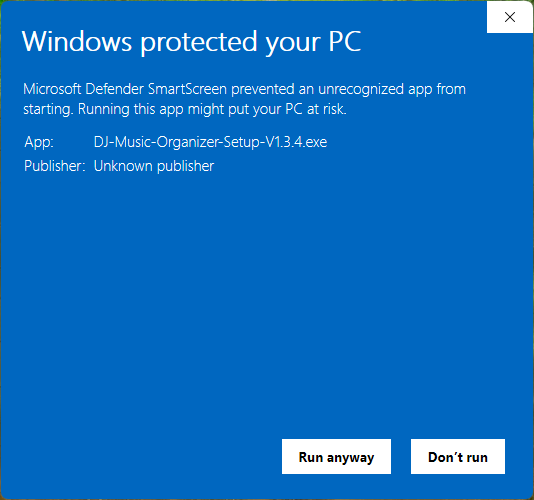
Before you decide, check all three:
决定之前,请确认以下三点:
- You downloaded it yourself from your Gumroad receipt or Library (step 1).
- 文件是你自己从 Gumroad 收据或 Library 下载的(第 1 步)。
- The file name is and its SHA-256 matches (step 2).
- 文件名是 ,而且 SHA-256 一致(第 2 步)。
- Microsoft Defender did not report a threat.
- Microsoft Defender 没有报告威胁。
Only if all three are true, you can decide for yourself to continue: click More info, check the app name, then click Run anyway. If you are not sure, click Don't run and contact support. We will never ask you to turn off SmartScreen, Defender or your antivirus.
只有三点都符合时,你可以自行决定是否继续:点更多信息,确认程序名称,再点仍要运行。如果不确定,请点不运行并联系我们。我们绝不会要求你关闭 SmartScreen、Defender 或防毒软件。
On a work or school PC, “Run anyway” may be missing because your organisation blocks unknown apps. Ask your IT administrator; please don't try to get around it.
在公司或学校的电脑上,可能没有“仍要运行”按钮,因为单位禁止未知程序。请询问你的 IT 管理员,不要尝试绕过。
4Install安装
- Open . No administrator password is needed: the app is installed for your Windows user only.
- 打开 。不需要管理员密码:软件只安装给你目前的 Windows 用户。
- Select Destination Location: keep the suggested folder and click Next.
- 选择安装位置:保留建议的文件夹,点下一步。
- Select Additional Tasks: tick Create a desktop shortcut if you want one, then click Next.
- 选择附加任务:需要桌面图标就勾选创建桌面快捷方式,然后点下一步。
- Click Install, then Finish. DJ Music Organizer opens and is also in the Start menu.
- 点安装,再点完成。DJ Music Organizer 会自动打开,开始菜单里也找得到。
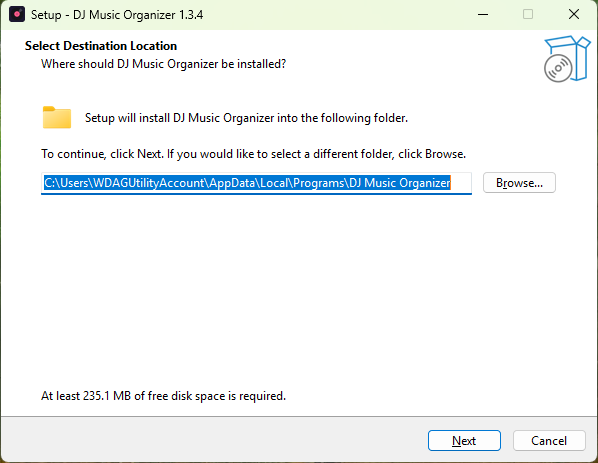
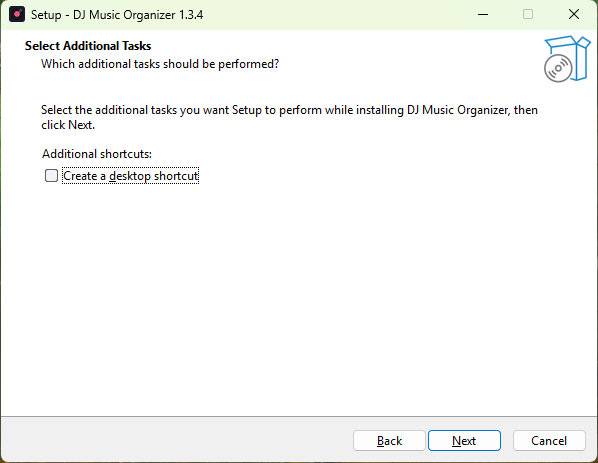
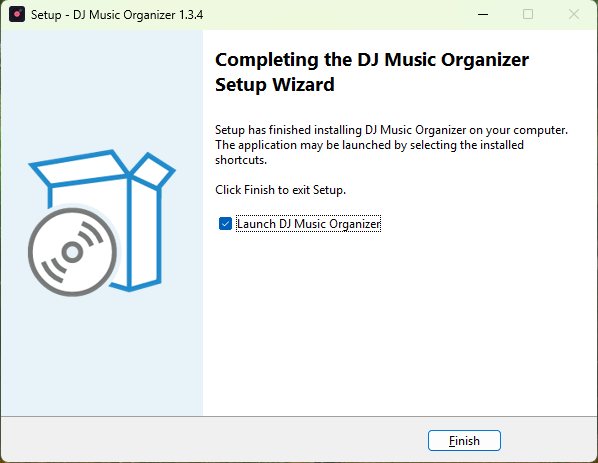
Already using the older single-file DJ-Music-Organizer.exe? Close it, then run Setup. Your activation, trial, settings and Undo history are kept automatically; you do not activate again and no computer transfer is used. Afterwards you can delete the old EXE file.
已经在用旧的单文件 DJ-Music-Organizer.exe?先关闭它,再运行安装程序。你的激活、试用、设置和撤销记录会自动保留;不需要重新激活,也不会消耗换电脑次数。装好后可以删掉旧的 EXE 文件。
5Activate with your purchase code用购买码激活
Your purchase code (Gumroad calls it the license key) is in your Gumroad receipt e-mail and in your Gumroad Library. It looks like XXXXXXXX-XXXXXXXX-XXXXXXXX-XXXXXXXX.
你的购买码(Gumroad 上叫 license key)在 Gumroad 收据邮件和 Gumroad Library 里,格式像 XXXXXXXX-XXXXXXXX-XXXXXXXX-XXXXXXXX。
- Open DJ Music Organizer and click Activate… (top of the window).
- 打开 DJ Music Organizer,点窗口上方的激活…。
- Paste the code into Purchase code.
- 把购买码粘贴到购买码栏。
- Click Activate online. The internet is needed only this once; afterwards the app also works offline.
- 点在线激活。只有这一次需要联网,之后离线也能使用。
Before activating you can use every feature free for 7 days. After the trial, renaming and moving are paused until you activate (Undo always works).
激活前可以免费试用全部功能 7 天。试用结束后,改名和移动会暂停,激活后恢复(撤销功能一直可以用)。
New computer? On the old computer open Activate… → Move to a new computer…, then activate the new computer with the same code. If the old computer is gone, contact support.
换新电脑?在旧电脑上打开激活… → 转移到新电脑…,再用同一个购买码在新电脑激活。如果旧电脑已经不能用,请联系我们。
Updates, reinstall and uninstall更新、重新安装与卸载
Get a new version
取得新版本
New versions appear in your Gumroad Library for the same purchase. Close DJ Music Organizer, download the new Setup, check its SHA-256 on this page, and run it. It updates the installed app in place and keeps your activation, settings and history.
新版本会出现在你的 Gumroad Library(同一笔购买)。关闭 DJ Music Organizer,下载新的安装程序,在本页核对 SHA-256,然后运行。它会直接更新已安装的软件,并保留你的激活、设置和记录。
Uninstall
卸载
Windows Settings → Apps → Installed apps → DJ Music Organizer → Uninstall. Uninstalling removes the program only. Your music files are never deleted. Your activation and settings stay on this PC, so reinstalling later does not need activation again.
Windows 设置 → 应用 → 已安装的应用 → DJ Music Organizer → 卸载。卸载只会移除程序本身,绝不会删除你的音乐文件。激活和设置会留在这台电脑上,以后重新安装不需要再次激活。
Troubleshooting常见问题
Setup says DJ Music Organizer is open安装程序说 DJ Music Organizer 正在运行
Setup never closes the app by itself, so a song move or Undo is never interrupted. Wait until it finishes, close DJ Music Organizer (also the old single-file version), then click Retry.
安装程序不会强制关闭软件,所以不会打断正在进行的移动或撤销。请等它完成,关闭 DJ Music Organizer(包括旧的单文件版本),再点重试。
There is no “Run anyway” button没有“仍要运行”按钮
Click More info first. If the button is still missing, your PC is managed by an organisation or set to allow Store apps only. Ask the PC's administrator, or contact us. Please don't turn off security features.
请先点更多信息。如果还是没有,代表这台电脑由单位管理,或设置成只允许 Microsoft Store 应用。请询问电脑管理员或联系我们,请不要关闭安全功能。
My antivirus blocked or removed the file防毒软件拦截或删除了文件
Don't turn the antivirus off. Download again from Gumroad and check the SHA-256. If it matches and is still blocked, send us the antivirus name and the message so we can report a false positive to the vendor.
请不要关闭防毒软件。从 Gumroad 重新下载并核对 SHA-256。如果一致仍被拦截,请把防毒软件名称和提示内容发给我们,我们会向厂商回报误判。
“This purchase code was not found”“找不到这个购买码”
Copy the code again from your Gumroad receipt or Library (all four groups, with the dashes). Make sure you paste it into Purchase code and click Activate online.
从 Gumroad 收据或 Library 重新复制购买码(四组,含横线)。确认是贴在购买码栏,然后点在线激活。
“Already in use on another computer”“已在另一台电脑使用”
Use Move to a new computer… on the old PC first, or contact support. Updating or reinstalling on the same PC never needs this.
请先在旧电脑上用转移到新电脑…,或联系我们。在同一台电脑上更新或重新安装不需要这样做。
“Cannot reach the activation server”“无法连接激活服务器”
Check your internet connection, VPN or firewall and try again. You can keep using the trial meanwhile. If it keeps failing, contact support with the machine code shown in the Activate window.
请检查网络、VPN 或防火墙后再试,期间可以继续试用。如果一直失败,请联系我们,并附上激活窗口里显示的本机代码。
I lost the download or my purchase code找不到下载文件或购买码
Open your Gumroad Library (sign in with the e-mail you used to buy) or search your e-mail for the Gumroad receipt.
打开你的 Gumroad Library(用购买时的邮箱登录),或在邮箱里搜寻 Gumroad 收据。
Support联系我们
Reply to your Gumroad receipt e-mail, or use the contact option on the product page. Please include your Windows version, the step where you are stuck and a screenshot. Never send your password. Your purchase code is only needed if we ask for it.
请直接回复 Gumroad 收据邮件,或在商品页面联系我们。请附上 Windows 版本、卡住的步骤和截图。绝对不要发送你的密码。只有在我们询问时才需要提供购买码。